Satellite Internet vs Cable Internet: Which Is Better?

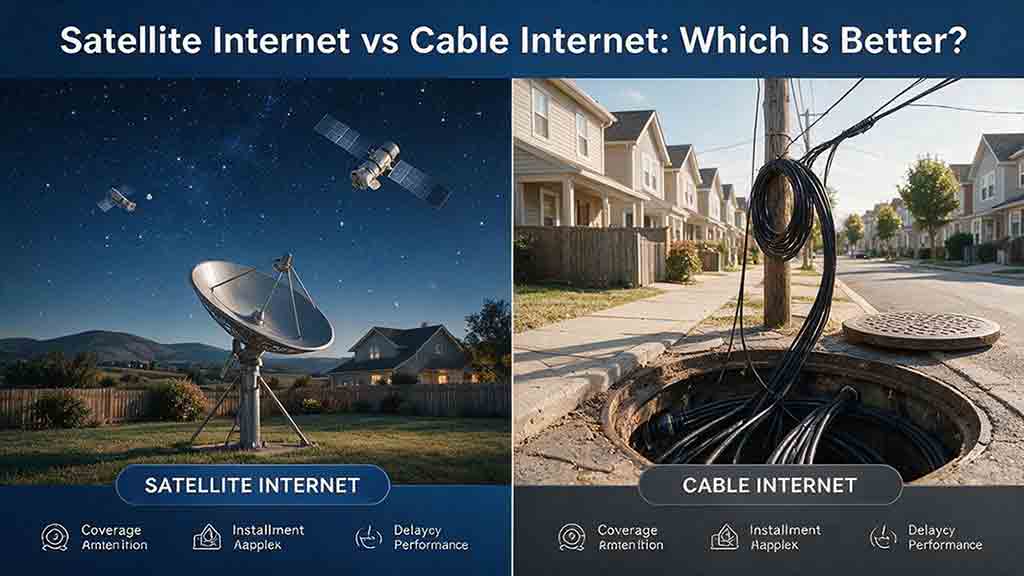
Cable internet is usually the better choice when both services are realistically available at a reasonable total cost. It generally provides lower latency, stronger upload performance, and more predictable capacity for gaming, video calls, and busy households. Satellite internet is often the better practical option when wired service cannot reach the property, cable construction is uneconomical, or remote coverage matters more than maximum performance.
Key Takeaways
- Choose cable when performance matters most. Cable is generally better for competitive gaming, frequent video meetings, large uploads, and homes with several active users.
- Choose satellite when geographic reach matters most. Satellite can serve rural, remote, seasonal, and difficult-to-wire properties beyond the practical reach of cable infrastructure.
- Do not compare every satellite service as if it were the same. Low Earth orbit satellite internet usually has much lower latency than traditional geostationary satellite service.
- Compare typical performance rather than headline maximums. Upload capacity, peak-hour consistency, latency, data policies, installation conditions, and long-term cost all affect the decision.
- Protect critical requirements before comparing scores. A high overall rating cannot compensate for a connection that fails an essential work, gaming, installation, or accessibility need.
This guide compares satellite internet vs cable internet using current official documentation, transparent calculations, and practical household-selection criteria.
It also introduces an Eligibility-First Internet Selection Test developed for this comparison:
- Confirm that each service is genuinely viable.
- Protect requirements that cannot be compromised.
- Score only the remaining trade-offs.
Research disclosure: This guide is based on official documentation and transparent editorial calculations. It does not claim hands-on testing or universal performance results.
Satellite Internet vs Cable Internet: What Are the Main Differences?
Cable normally has the performance advantage, while satellite normally has the coverage advantage.
| Factor | Cable internet | Satellite internet | Typical advantage |
|---|---|---|---|
| Availability | Requires nearby cable infrastructure | Can reach many remote locations with a suitable sky view | Satellite |
| Download performance | Usually higher and more consistent | Varies by orbit, plan, location, and congestion | Cable |
| Upload performance | Generally stronger | Commonly more limited | Cable |
| Latency | Usually lower | LEO can be responsive; GEO is much slower | Cable |
| Peak-hour consistency | Depends on local cable capacity | Depends on satellite capacity and traffic priority | Usually cable |
| Data policies | Often generous, but regional limits may apply | Priority-data rules are more common | Usually cable |
| Installation | Requires a serviceable cable path | Requires compatible equipment and a clear sky view | Depends |
| Total cost | May include promotions or construction charges | May include terminal and mounting costs | Depends |
| Best use case | Connected homes with demanding applications | Rural or difficult-to-wire properties | Depends |
These are broad patterns rather than guarantees.
A modern low Earth orbit connection can outperform an old, overloaded, or low-tier cable service at a particular address. A properly maintained cable network, however, will usually offer a higher performance ceiling and more predictable responsiveness than residential satellite internet.
The correct decision therefore begins with the property—not with a national advertisement.
How Do Cable and Satellite Internet Carry Data?
The main difference is the path that data follows between the property and the provider’s wider network.
How Does Cable Internet Work?
Cable internet normally operates over a hybrid fiber-coaxial network, often abbreviated as HFC.
Fiber carries traffic through much of the provider’s network. Coaxial cable then completes part of the connection to individual homes or buildings.
A cable modem communicates with the network using DOCSIS technology. According to CableLabs’ DOCSIS 4.0 overview, the current standard supports substantial downstream and upstream capacity over HFC infrastructure.
Those technical capacities are not the retail speeds delivered to every household.
Actual cable performance depends on:
- The provider’s local deployment
- Available neighborhood capacity
- The purchased service tier
- Modem and network equipment
- Internal coaxial wiring
- Signal quality
- Demand from nearby users
A technical standard describes what a suitably deployed network can support. It does not mean every cable operator has completed the same upgrades or that every customer receives the standard’s maximum capacity.
How Does Satellite Internet Work?
Satellite internet sends radio signals between a terminal at the property and satellites in orbit.
Traffic then reaches the wider internet through:
- Ground gateways
- Terrestrial fiber networks
- Inter-satellite links
- Provider routing systems
- A combination of these paths
The central advantage is that a cable line does not need to reach the building.
The main physical requirement is that the terminal must normally have an unobstructed view of the relevant part of the sky.
Satellite internet uses a user terminal, satellites, gateways, and terrestrial backhaul to move data between the home and the wider internet.
Why Does the Satellite’s Orbit Change Performance?
Orbital altitude affects latency, network design, coverage, and how the user terminal communicates with the system.
The two satellite categories most relevant to residential internet are low Earth orbit and geostationary orbit.
Low Earth Orbit Satellite Internet
Low Earth orbit, or LEO, satellites operate much closer to Earth than geostationary satellites.
The shorter signal path allows LEO systems to provide latency suitable for ordinary video calls, streaming, web applications, and many online games.
A LEO network uses a moving constellation rather than one satellite remaining above the same location. User terminals may switch between satellites, while traffic routes can change as the constellation moves.
As one current provider example, the Starlink specifications accessed on August 2, 2026 state that users typically experience:
- Download speeds between 45 and 280 Mbps
- Upload speeds between 10 and 30 Mbps
- Land-based latency between 25 and 60 milliseconds
The same specifications explain that performance can vary by location, plan, time of day, traffic priority, network demand, equipment, and installation conditions.
These figures describe one current version of one provider’s specifications. They are not universal LEO performance figures.
Starlink specifications may differ by:
- Country or service region
- Residential, priority, or mobility plan
- Legal-document version
- Available network capacity
- Remote-location conditions
Readers considering Starlink should therefore review the specifications linked from the plan available at their own address rather than assuming one published range applies everywhere.
Geostationary Satellite Internet
A geostationary satellite operates approximately 35,786 kilometers, or 22,236 miles, above Earth’s equator.
At that altitude, its orbital motion matches Earth’s rotation. A geostationary satellite can therefore remain over the same general location on Earth.
NASA’s explanation of orbital classes identifies the approximate 35,786-kilometer altitude and distinguishes geostationary orbit from lower orbital classes.
That distance creates unavoidable propagation delay.
A simplified satellite internet round trip may contain four major space segments:
- User terminal to satellite
- Satellite to ground gateway
- Ground gateway back to satellite
- Satellite back to the user terminal
A Simplified GEO Propagation Estimate
Using the approximate orbital altitude and the speed of light:
4 × 35,786 km ÷ 299,792 km/s ≈ 0.477 seconds
The result is approximately 477 milliseconds.
This is a simplified lower-bound propagation estimate, not a complete model of an operating satellite network or a predicted customer ping result.
Real-world latency is normally higher because:
- The radio path is not perfectly vertical
- Users and gateways may be geographically separated
- Traffic must also cross terrestrial networks
- Routers and gateways process each packet
- Queuing and congestion introduce additional delay
- Satellite systems use different gateway and routing architectures
The calculation nevertheless explains why traditional GEO internet can deliver adequate download throughput while still feeling delayed during interactive activities.
Satellite latency depends strongly on orbital distance, while LEO and GEO systems have very different propagation limits.
Which Has Better Performance?
Cable internet generally provides the stronger combination of download speed, upload capacity, and low latency.
Performance should not be reduced to one speed number. Download speed, upload speed, latency, packet loss, and consistency affect different activities.
Which Has Faster Download Performance?
Cable normally has the higher performance ceiling, especially in areas with upgraded infrastructure.
It is also more likely to support several high-bandwidth activities at the same time without requiring the household to manage usage closely.
Satellite performance may change with:
- Satellite orbit
- Available system capacity
- Service plan
- Local subscriber density
- Traffic priority
- Ground infrastructure
- Terminal installation
- Obstructions
- Weather
- Time of day
A capable LEO service may be adequate for streaming, browsing, software downloads, and ordinary remote work.
The useful question is not simply whether satellite can be fast. It is whether the specific plan can provide adequate typical performance at the exact location.
Which Has Lower Latency?
Cable normally has lower and more stable latency.
Latency is the time required for data to travel between the user and a remote system. It affects responsiveness rather than the total volume of data a connection can transfer.
Low latency matters most for:
- Competitive online gaming
- Video and voice calls
- Remote desktop software
- Interactive cloud applications
- Live collaboration
- Some corporate VPNs
- Real-time monitoring tools
LEO systems have narrowed the latency gap between satellite and terrestrial broadband. GEO systems remain constrained by the distance to orbit.
Which Is Better for Uploading?
Cable is generally better for frequent or large uploads.
Many cable plans are asymmetrical, meaning download speed is higher than upload speed. Even so, residential cable upload capacity commonly exceeds that of satellite plans.
Upload performance matters when users:
- Back up large folders to cloud storage
- Upload videos or design files
- Send large media projects
- Host livestreams
- Synchronize business databases
- Operate cloud-connected security cameras
- Participate in several video meetings
Remote workers should compare typical upload speed and typical latency, not only the advertised download speed.
How Much Speed Does a Household Actually Need?
The appropriate plan depends on simultaneous activity, not simply the number of devices connected to the router.
Consider a household using:
- Two simultaneous 4K video streams
- One 1080p group video call
- Web browsing and messaging
- Smart-home devices
- Background updates
Netflix recommends a stable connection of at least 15 Mbps for one 4K stream.
For its Web App, Zoom lists approximately 3.8 Mbps upload and 3.0 Mbps download for a 1080p group video call.
Illustrative Bandwidth Estimate
| Activity | Estimated download demand |
|---|---|
| Two 4K Netflix streams | 30 Mbps |
| One 1080p Zoom group call | 3 Mbps |
| Background household allowance | 10–20 Mbps |
| Estimated simultaneous demand | 43–53 Mbps |
The 10–20 Mbps background allowance is an editorial planning buffer, not an official application requirement.
It allows room for activities such as:
- Webpage loading
- App synchronization
- Smart-device traffic
- Messaging
- Short software updates
- Other active household devices
The estimate does not cover every traffic burst. Large downloads and operating-system updates can temporarily consume substantially more capacity.
Planning Recommendation
For this example, a connection that typically delivers approximately 75–100 Mbps download would provide more practical headroom than one that only occasionally reaches 50 Mbps.
This is a planning recommendation for the stated example, not a universal minimum.
The household must also consider upload capacity. Approximately 10 Mbps of reliable upload performance would provide useful room for the video call and modest background uploads in this scenario, while several meetings, cameras, or large file transfers may require more.
The FCC’s 100/20 Mbps benchmark should not be treated as a universal plan recommendation. The FCC adopted 100 Mbps download and 20 Mbps upload as a policy benchmark for evaluating advanced telecommunications capability.
It does not guarantee that a 100/20 Mbps connection will meet every household’s needs.
Which Is More Reliable?
Cable is usually more consistent when the local network is well maintained, but neither technology is universally more reliable.
Cable and satellite connections have different failure points.
Common Cable Reliability Risks
Cable service may be affected by:
- Damaged aerial or buried lines
- Neighborhood power failures
- Local node congestion
- Loose or corroded connectors
- Poor internal coaxial wiring
- Faulty splitters
- Provider maintenance
- Modem or network equipment faults
Ordinary rain and cloud cover do not directly interrupt the physical cable path between the property and the provider.
Common Satellite Reliability Risks
Satellite service may be affected by:
- Trees or buildings blocking the terminal
- Heavy rain or dense storm cells
- Snow or ice accumulation
- Incorrect mounting
- Terminal movement
- Local network congestion
- Gateway or routing problems
- Unstable electrical power
- Plan-based traffic priority
Rain, snow, wind, and installation conditions can affect satellite performance in different ways.
Reliability Is Local
A national comparison cannot determine the condition of a neighborhood cable plant or the obstruction risk at a rural property.
Useful local evidence includes:
- Repeated wired tests during peak hours
- Packet-loss measurements
- Brief-interruption records
- Outage history
- Reports from several nearby addresses
- Provider repair times
- Visible cable-line condition
- Satellite obstruction scans
- Seasonal tree growth
- Weather exposure at the mounting location
A single speed test or one neighbor’s comment is not enough to establish reliability.
The Two-Source Reliability Rule
Before giving reliability a numerical score, use evidence from at least two different categories:
- Location evidence, such as nearby service history, an obstruction scan, or the condition of local infrastructure.
- Time-based evidence, such as repeated evening tests, several days of packet-loss monitoring, or documented outages.
These two categories answer different questions.
Location evidence indicates whether the property has a structural or geographic disadvantage. Time-based evidence indicates whether performance remains consistent under changing demand and operating conditions.
When adequate evidence is unavailable, use a provisional score and mark its confidence as low.
Reliability Confidence Levels
| Confidence | Evidence standard |
|---|---|
| High | Repeated local measurements or a documented service history |
| Medium | Several nearby reports combined with provider or installation evidence |
| Low | Assumptions, limited reports, one-time tests, or national reputation |
Confidence describes the quality of evidence behind a score. It does not describe the reliability of the service itself.
A service can have:
- A high reliability score supported by low-confidence evidence
- A moderate reliability score supported by high-confidence evidence
Those are different judgments and should not be combined into one number.
Path Diversity Is Not Guaranteed Backup
Satellite can provide path diversity because it does not depend on the same physical cable entering the property.
That may make it useful when a local cable line is damaged.
A complete backup plan may also require:
- Battery power
- Router failover support
- Separate network paths
- Automatic connection switching
- Periodic failover testing
Does Satellite Internet Always Have Data Caps?
No, but satellite plans are more likely to use priority-data thresholds, deprioritization, or congestion-management policies.
A plan described as unlimited may still change how traffic is handled after a usage threshold. Traffic may receive lower priority during busy periods without the provider disconnecting service or charging a traditional overage fee.
Cable policies also vary. Depending on the provider and market, a cable plan may have:
- No fixed monthly allowance
- A monthly data limit
- Overage charges
- An optional unlimited-data fee
- Network-management rules
Before ordering, determine:
- Whether the plan has a monthly allowance
- Whether some usage is classified as priority data
- What happens after a threshold
- Whether overage charges apply
- Whether performance changes only during congestion
- Whether different activities receive different treatment
- Whether usage follows the billing cycle or calendar month
The word unlimited should not replace reading the actual policy.
In the United States, FCC Broadband Consumer Labels provide standardized plan disclosures covering information such as pricing, introductory rates, broadband performance, data allowances, and fees.
The FCC adopted changes to simplify its broadband-label rules in July 2026. Consumers should therefore use the current label shown at the provider’s point of sale rather than relying on an older screenshot or third-party summary.
Which Costs Less?
Neither technology is always cheaper because installation and equipment can outweigh the advertised monthly price.
Cable may offer a low introductory rate that rises later. A property outside the existing cable footprint may also require a construction contribution.
Satellite service may involve:
- Terminal purchase or rental
- Shipping
- Mounting hardware
- Professional installation
- Replacement equipment
- Priority-data charges
- Mobility-plan charges
Total-Cost Formula
Use:
Total cost = service charges + equipment + installation + activation + taxes and fees + expected overages − confirmed discounts
For a promotional cable plan:
24-month service cost = promotional-period charges + standard-price charges + recurring equipment fees + one-time costs
Both services must be calculated over the same period.
A lower first-year monthly price does not necessarily make a plan the lower-cost option.
Illustrative Example: A Rural Home With a Cable Construction Charge
This is an illustrative editorial example, not a provider quote or prediction of typical market pricing.
Assumptions
| Cost | Cable | Satellite |
|---|---|---|
| Cable construction or satellite equipment | $2,500 | $349 |
| Monthly service | $70 | $120 |
| Comparison period | 24 months | 24 months |
| Taxes, promotions, and extra fees | Excluded | Excluded |
24-Month Cost
Cable:
$2,500 + ($70 × 24) = $4,180
Satellite:
$349 + ($120 × 24) = $3,229
Under these assumptions, satellite costs $951 less over 24 months.
Cost-Crossover Point
The cable plan costs $50 less each month:
$120 − $70 = $50
Cable requires $2,151 more upfront:
$2,500 − $349 = $2,151
Estimated crossover:
$2,151 ÷ $50 = 43.02 months
Under the stated assumptions, cable becomes less expensive after approximately 44 months.
This result changes if the monthly price, construction charge, equipment cost, promotion, tax, or expected period of use changes.
What the Cost Calculation Cannot Decide
Cable may justify its higher initial cost when the household:
- Expects to remain for many years
- Depends on daily video meetings
- Uploads large files
- Plays latency-sensitive games
- Needs predictable multi-device capacity
Satellite may remain more practical when the household:
- Expects to move within several years
- Cannot justify the construction expense
- Has moderate internet requirements
- Can install the terminal easily
- Values faster deployment
The broader lesson is that monthly price alone can produce the wrong decision when installation costs differ substantially.
The Eligibility-First Internet Selection Test
Many internet comparisons begin with advertised speed.
For satellite internet, that is often the wrong starting point. A theoretically faster service has no value when it cannot be ordered or installed properly.
The decision principle is:
Confirm viability, protect non-negotiable requirements, then compare the remaining trade-offs.
Stage One: The Eligibility Gate
The Eligibility Gate should be used only for hard conditions established before scoring.
A disadvantage that is inconvenient or unattractive—but still acceptable—belongs in the weighted comparison. It should not automatically eliminate the service.
A Service Passes the Eligibility Gate When It:
- Can be ordered for the exact address
- Can be installed safely
- Can be installed legally
- Has a realistic physical installation path
- Meets any pre-established absolute budget ceiling
- Can be activated before a genuinely necessary deadline
- Does not conflict with a non-negotiable contract condition
- Has the environmental conditions required by the technology
For cable, this may require:
- An existing nearby network
- Permission to cross relevant property
- A workable route for the line
- A construction charge below the household’s absolute limit
- An activation date that meets a real deadline
For satellite, this may require:
- A usable sky view
- A secure mounting location
- Permission from the owner or association
- Reliable electrical power
- No permanent structural obstruction
When Should an Option Be Removed?
Remove a service only when it fails a genuine hard requirement.
Examples include:
- The provider will not accept an order for the address
- The terminal cannot obtain a usable sky view
- The installation is prohibited
- The installation presents an unresolved safety problem
- Construction exceeds a budget ceiling established before comparison
- Activation would occur after a non-negotiable deadline
- The contract directly conflicts with an essential condition
A high price, inconvenient installation, long contract, or slow activation should remain in the scoring stage when it is undesirable but still acceptable.
The Eligibility Gate answers one question:
Can this service realistically be obtained and used?
Stage Two: Protect Critical Requirements
A service that passes the Eligibility Gate may still fail an application the household cannot compromise on.
A high weighted score cannot compensate for failure on a critical requirement.
Examples of Critical Requirements
- A required work VPN must remain usable
- A content creator needs a minimum upload capability
- A competitive gamer needs acceptable latency and packet loss
- A remote worker needs stable video calling
- A satellite terminal must not experience persistent obstruction
- A household with essential connectivity needs a backup path
- A service must support a required static-IP or networking arrangement
Define critical requirements before assigning scores.
Where possible, write each requirement as a pass-or-fail statement:
- “The connection must sustain our work VPN during a 30-minute trial.”
- “Typical upload performance must support two simultaneous video meetings.”
- “The satellite obstruction check must show no recurring blockage in the required sky area.”
- “The service must be active before the current contract ends.”
If a service fails one of these requirements, remove it or mark it Not Recommended.
Do not allow low cost or high download speed to hide a failure that would make the connection unsuitable for its intended purpose.
Stage Three: Score the Remaining Trade-Offs
Only services that pass the Eligibility Gate and critical requirements should enter the weighted comparison.
Availability is not included as a score because basic availability has already been resolved.
This prevents one problem from being counted several times.
For example, an expensive cable extension may reduce:
- The total-cost score
- The installation-burden score
It should not also reduce availability when the provider has confirmed that service can be installed.
Build Your Own Internet Score
Score each remaining service from 0 to 5:
| Score | Meaning |
|---|---|
| 0 | Fails this individual preference but remains technically viable |
| 1 | Very poor |
| 2 | Below the preferred level |
| 3 | Adequate |
| 4 | Good |
| 5 | Excellent |
A score of 0 is different from failing the Eligibility Gate.
If the factor is genuinely non-negotiable, the service should be handled under Stage Two rather than assigned a 0 and allowed to continue.
Default Weights
| Factor | Default weight |
|---|---|
| Latency-sensitive performance | 20% |
| Typical download performance | 15% |
| Upload capacity | 15% |
| Reliability and peak-hour consistency | 20% |
| Data policy | 10% |
| 24-month total cost | 15% |
| Installation and maintenance burden | 5% |
| Total | 100% |
Calculate:
Weighted score = Σ (factor score × decimal weight)
The final result will fall between 0 and 5.
These weights are an editorial starting point rather than a standardized engineering model. The result changes when the household changes its priorities, evidence, scores, or assumptions.
Keep an Evidence Ledger
A score is more useful when the reason behind it is recorded.
Use a simple worksheet:
| Factor | Score | Evidence | Confidence |
|---|---|---|---|
| Latency | Wired tests, provider label, nearby reports | High / Medium / Low | |
| Download | Typical speed disclosure, local tests | High / Medium / Low | |
| Upload | Typical upload disclosure, test results | High / Medium / Low | |
| Reliability | Outage history, packet loss, obstruction scan | High / Medium / Low | |
| Data policy | Provider label and network-management policy | High / Medium / Low | |
| Total cost | Written quote and billing terms | High / Medium / Low | |
| Installation | Site inspection or confirmed installation plan | High / Medium / Low |
This evidence ledger is more important than adding extra decimal places to the final score.
A score of 3.8 supported by weak assumptions may be less useful than a score of 3.5 supported by repeated local measurements and a written quote.
Adjust the Weights for Your Household
- Competitive gamers: Increase latency weight.
- Content creators: Increase upload weight.
- Remote workers: Increase reliability, latency, and upload weights.
- Heavy streamers: Increase download and data-policy weights.
- Short-term residents: Increase total-cost weight.
- Seasonal-property owners: Increase installation and maintenance weight.
- Work-critical households: Increase reliability and assess backup service separately.
Scoring the Illustrative Rural Home
Both hypothetical services pass the Eligibility Gate:
- Cable can be installed, although it requires an expensive line extension.
- Satellite can be installed with a suitable sky view.
Neither service fails the household’s assumed critical requirements.
Why the Example Uses These Scores
| Factor | Cable assumption | Satellite assumption |
|---|---|---|
| Latency | Low and stable local latency is expected | Responsive LEO service with greater variation |
| Download | A high-capacity cable tier is available | LEO capacity is adequate but lower |
| Upload | Cable provides stronger typical uploads | Satellite upload is sufficient but more limited |
| Reliability | Nearby cable history is generally favorable | Clear sky view, with some weather and routing variability |
| Data policy | Local cable policy is more generous | Satellite plan uses traffic-priority management |
| Cost | Construction raises the 24-month total | Lower initial equipment expense |
| Installation | A long cable extension is required | Terminal installation is comparatively straightforward |
These assumptions demonstrate the method. They are not measurements of real providers or predictions for a particular property.
Example Scores
| Factor | Weight | Cable score | Satellite score |
|---|---|---|---|
| Latency-sensitive performance | 20% | 5 | 3 |
| Typical download performance | 15% | 5 | 4 |
| Upload capacity | 15% | 4 | 3 |
| Reliability and peak-hour consistency | 20% | 4 | 3 |
| Data policy | 10% | 4 | 3 |
| 24-month total cost | 15% | 2 | 4 |
| Installation and maintenance burden | 5% | 1 | 4 |
Cable Calculation
(5 × 0.20) + (5 × 0.15) + (4 × 0.15) + (4 × 0.20) + (4 × 0.10) + (2 × 0.15) + (1 × 0.05)
= 1.00 + 0.75 + 0.60 + 0.80 + 0.40 + 0.30 + 0.05
= 3.90
Satellite Calculation
(3 × 0.20) + (4 × 0.15) + (3 × 0.15) + (3 × 0.20) + (3 × 0.10) + (4 × 0.15) + (4 × 0.05)
= 0.60 + 0.60 + 0.45 + 0.60 + 0.30 + 0.60 + 0.20
= 3.35
Confidence in the Example Scores
Assume the cable score is supported by a construction quote, several nearby reports, and repeated local tests. Its illustrative confidence would be medium.
Assume the satellite score is based mainly on official specifications and an obstruction scan, without service history at the property. Its illustrative confidence would be low.
The result can therefore be summarized as:
- Cable: 3.90 — medium confidence
- Satellite: 3.35 — low confidence
Under the stated assumptions and default weights, cable receives the higher score despite its higher 24-month cost.
The result could change for:
- A short-term resident who gives cost more weight
- A household with little need for low latency
- A location with poor cable reliability
- A property with strong local satellite performance
- A homeowner unwilling to fund cable construction
The score does not declare one technology universally superior. It exposes the trade-offs, assumptions, and evidence behind the decision.
Which Is Better for Different Users?
Rural Home Without Cable or Fiber
Begin with LEO satellite, fixed wireless, and cellular home internet. GEO satellite may still provide essential access where no more responsive alternative exists.
Suburban Family With Cable Access
Cable will usually provide the stronger balance of capacity and responsiveness. It is generally better suited to several streams, computers, consoles, cameras, and downloads operating together.
Competitive Gamer
Choose cable when reliable cable service is reasonably available. LEO satellite can support many games, but latency variation and brief interruptions may be noticeable in reaction-sensitive competition.
Remote Worker
Prefer cable for work-critical use when it is reasonably available. Consider LEO satellite where cable is unavailable or disproportionately expensive, after checking uploads, VPN behavior, peak-hour consistency, and backup options.
Seasonal Cabin
Satellite may be more practical when wired construction is uneconomical. Check equipment storage, electrical power, tree cover, snow exposure, and plan-location restrictions.
Heavy Streaming Household
Cable normally offers more comfortable capacity. Satellite may still work, but evening performance and data-priority rules deserve more attention than an advertised maximum.
What Are the Main Advantages and Limitations?
Cable Internet Advantages
- Lower latency
- Higher performance ceiling
- Stronger upload capacity
- Better multi-device performance
Cable Internet Limitations
- Limited rural availability
- Possible neighborhood congestion
- Promotional price increases
- Potential construction charges
Satellite Internet Advantages
- Broad rural and remote reach
- No cable line required
- Useful for isolated or seasonal properties
- Can provide a separate connection path
Satellite Internet Limitations
- Requires a suitable sky view
- Greater performance variability
- More sensitivity to weather and obstructions
- Potential equipment and priority-data costs
What Mistakes Lead to the Wrong Choice?
Comparing Only Download Speed
A 200 Mbps plan is not automatically better than a 100 Mbps plan.
Latency, upload capacity, consistency, data policy, and household demand may matter more in everyday use.
Treating LEO and GEO as the Same
LEO and GEO systems have fundamentally different signal distances and latency characteristics.
The orbit should always be identified before evaluating a satellite service.
Assuming Unlimited Means Unmanaged
Unlimited service may still use deprioritization, priority thresholds, or congestion-management rules.
Read the actual policy rather than relying on one word.
Comparing Promotional and Standard Prices
Calculate both services across the same period and include the price after discounts expire.
Ignoring Installation Conditions
A satellite terminal cannot perform properly through major permanent obstructions.
Cable may be technically available but financially impractical when a long line extension is required.
Counting the Same Disadvantage More Than Once
A construction charge should affect total cost and installation burden.
It should not also reduce availability after the service has passed the Eligibility Gate.
Trusting a Score Without Examining Its Evidence
A precise-looking result built from assumptions is still uncertain.
Record the evidence and confidence behind important ratings, especially reliability.
Blaming the Provider for Poor Wi-Fi
An old router, interference, weak device radios, or poor access-point placement can make a good internet connection appear slow.
Test with Ethernet before switching providers whenever practical.
How Can You Troubleshoot Before Switching?
1. Test at Several Times
Measure performance during:
- Morning
- Afternoon
- Evening peak hours
- A weekend
- Different weather conditions
Record:
- Download speed
- Upload speed
- Latency
- Packet loss
- Brief interruptions
2. Test With Ethernet
Connect one computer directly to the router or modem.
Good wired performance combined with poor Wi-Fi usually indicates an internal network problem rather than a weak provider connection.
3. Inspect the Equipment
Check:
- Loose coaxial connections
- Damaged cables
- Faulty splitters
- Modem or router warnings
- Satellite-terminal movement
- Snow, ice, or debris
- New tree growth
- Equipment overheating
- Available firmware updates
4. Pause Background Traffic
Temporarily stop:
- Cloud backups
- Game downloads
- Operating-system updates
- Large file transfers
- Security-camera uploads
- High-resolution streaming
5. Review the Plan Policy
Confirm whether the account has crossed a data threshold or entered a lower-priority service state.
6. Contact the Provider With Evidence
Provide:
- Test dates and times
- Wired and wireless results
- Packet-loss observations
- Equipment status
- Weather conditions
- Error messages
- Outage history
Specific evidence is more useful than reporting that the connection simply feels slow.
Internet Buying Checklist
Before ordering cable or satellite service, confirm:
- The provider accepts orders for the exact address
- The service passes the Eligibility Gate
- Critical applications have been checked
- Construction charges are documented
- Typical download speed meets household demand
- Typical upload speed supports calls and uploads
- Typical latency supports required applications
- Peak-hour consistency has been investigated
- Reliability scores have evidence and confidence labels
- Data-management rules are understood
- Post-promotion pricing is acceptable
- Equipment and installation costs are included
- Contract and cancellation terms are acceptable
- Satellite users have a suitable sky view
- Remote workers have checked VPN requirements
- Critical households have considered backup power and connectivity
Which Should You Choose?
Choose cable when it passes the Eligibility Gate, supports every critical application, and provides acceptable long-term value for a household that depends on low latency, uploads, gaming, or several simultaneous devices.
Choose satellite when wired broadband is unavailable, cannot be installed safely or legally, or requires a construction commitment that does not make sense for the property and expected period of use.
The practical next steps are:
- Confirm eligibility.
- Compare local performance and reliability.
- Calculate total cost and apply household priorities.
The better service is not the one with the strongest national advertisement. It is the viable connection that meets the household’s essential needs with the fewest unacceptable compromises.
Frequently Asked Questions
Can satellite internet be faster than cable internet?
Yes, at a particular address. A modern LEO service may outperform an old, congested, or low-tier cable connection. A well-maintained cable network, however, generally offers a higher performance ceiling, stronger uploads, and more predictable latency. Compare local typical performance instead of assuming the technology alone determines the result.
Is satellite internet good enough for working from home?
LEO satellite can support email, cloud documents, video meetings, and many business applications. Suitability depends on upload speed, latency, brief interruptions, VPN behavior, and the consequences of an outage. Work-critical users should treat VPN compatibility and connection stability as critical requirements rather than ordinary scoring factors.
Can I play online games using satellite internet?
Many games can work over LEO satellite internet. Competitive games are generally better on cable because cable tends to provide lower and more stable latency. GEO satellite service has much higher propagation delay and is poorly suited to reaction-sensitive competition.
Does cable internet slow down when neighbors are online?
It can. Cable networks use shared local capacity, so demand may affect performance during busy periods. The effect depends on network design, available capacity, maintenance, and local usage. Repeated wired tests during peak hours provide better evidence than one daytime result.
Does rain or snow stop satellite internet?
Ordinary weather does not necessarily interrupt service. Intense rain, dense storm cells, wet snow, ice, or accumulation on the terminal can weaken the signal. The effect depends on the system, frequencies, installation quality, obstruction level, and severity of the weather.
Is satellite a good backup for cable internet?
Satellite can provide useful path diversity because it does not depend on the same physical cable entering the property. A complete backup plan may also require battery power, a compatible router, automatic or manual failover, and periodic testing.
How This Article Was Researched
This article was prepared using the following process:
- Regulatory and consumer-label information was checked against current FCC resources.
- Address-availability guidance was checked against the FCC National Broadband Map.
- Geostationary orbital altitude was checked against NASA Earthdata.
- Cable-network capabilities were checked against CableLabs documentation.
- The LEO provider example was checked against a current Starlink specifications document.
- Streaming guidance was checked against Netflix documentation.
- Video-call bandwidth was checked against Zoom documentation.
- The GEO propagation figure was independently calculated and labeled as a lower-bound estimate.
- The household bandwidth allowance, rural cost example, and weighted scores were identified as editorial assumptions.
- The selection model separates eligibility, critical requirements, weighted trade-offs, and evidence confidence.
- Provider pricing was not presented as universal because it varies by address, plan, promotion, date, and installation.
Specifications, policies, and availability can change. Dynamic sources were last checked on August 2, 2026.
Sources
Federal Communications Commission — Broadband Consumer Labels
Current consumer information about broadband-label disclosures and comparison shopping. Accessed August 2, 2026.Federal Communications Commission — July 2026 Broadband Label Update
Official summary of the July 2026 changes to broadband-label rules. Accessed August 2, 2026.FCC National Broadband Map
Address-level provider-reported broadband availability and public challenge information. Accessed August 2, 2026.Federal Communications Commission — Broadband Speed Benchmark
Official source for the 100/20 Mbps fixed broadband policy benchmark. Released March 18, 2024.NASA Earthdata — Orbits
Reference for orbital classifications and the approximate 35,786-kilometer geostationary altitude. Accessed August 2, 2026.CableLabs — DOCSIS 4.0 Technology
Technical background on modern hybrid fiber-coaxial network capacity. Accessed August 2, 2026.Starlink — Specifications
Official example of LEO performance ranges and factors affecting service. Specifications may differ by country, plan, service category, network conditions, and document version. Accessed August 2, 2026.Netflix Help Center — Recommended Internet Speeds
Official recommendation of at least 15 Mbps for one 4K stream. Accessed August 2, 2026.Zoom Support — Zoom Web App System Requirements
Official bandwidth guidance, including approximately 3.8 Mbps upload and 3.0 Mbps download for a 1080p group video call. Accessed August 2, 2026.
More from Satellite Internet & Connectivity
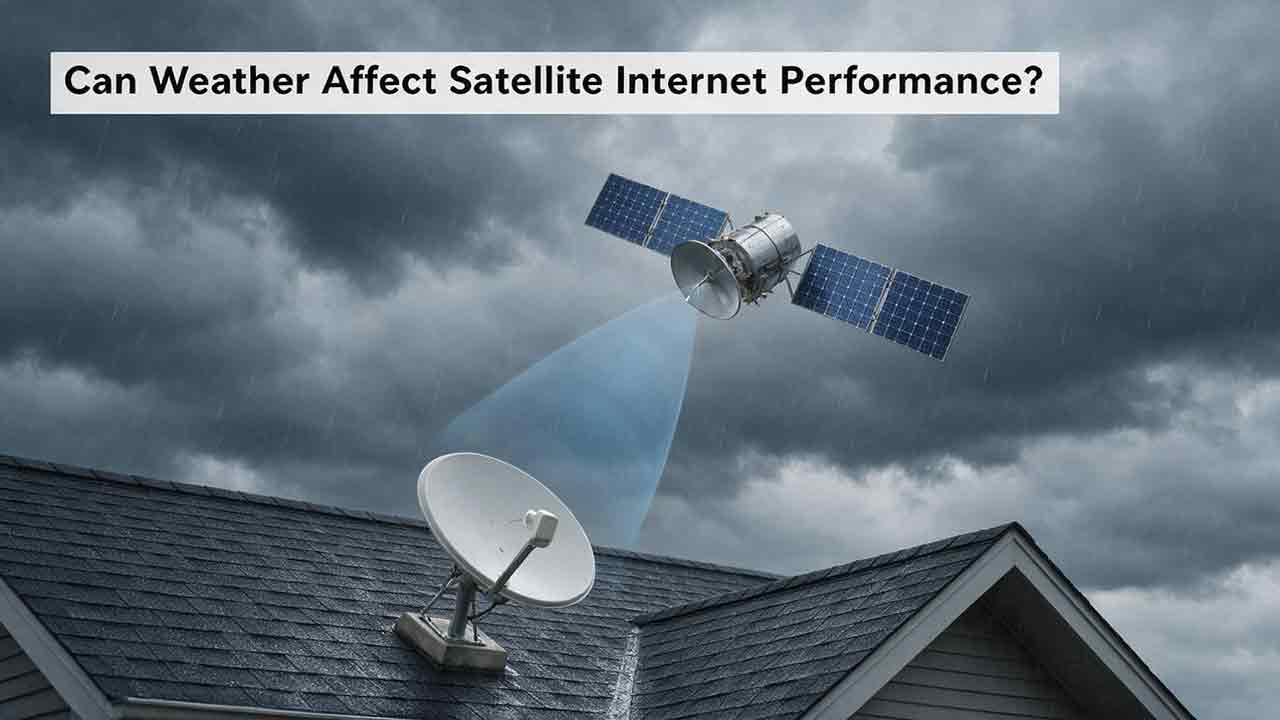
Can Weather Affect Satellite Internet Performance?
Weather can affect satellite internet performance, but the severity depends on the type of weather, signal frequency, equipment condition, installation quality, and network architecture. This guide explains how intense rain can cause temporary signal attenuation, why wet snow and ice may affect both the radio path and the terminal, and how wind, lightning, extreme temperatures, and power failures can disrupt service indirectly. It also explains why users may experience an outage under clear local skies when severe weather affects a distant provider gateway. To help readers diagnose problems safely, the article introduces the CosmoBasics Weather Impact Triangle, separating signal-path, terminal, and infrastructure risks. Readers also receive a practical troubleshooting process, a reusable weather incident log, common-mistake warnings, and a harsh-climate buying checklist. The guide relies on ITU, NASA, NOAA, FCC, and provider documentation while clearly distinguishing general engineering principles from model-specific equipment features.
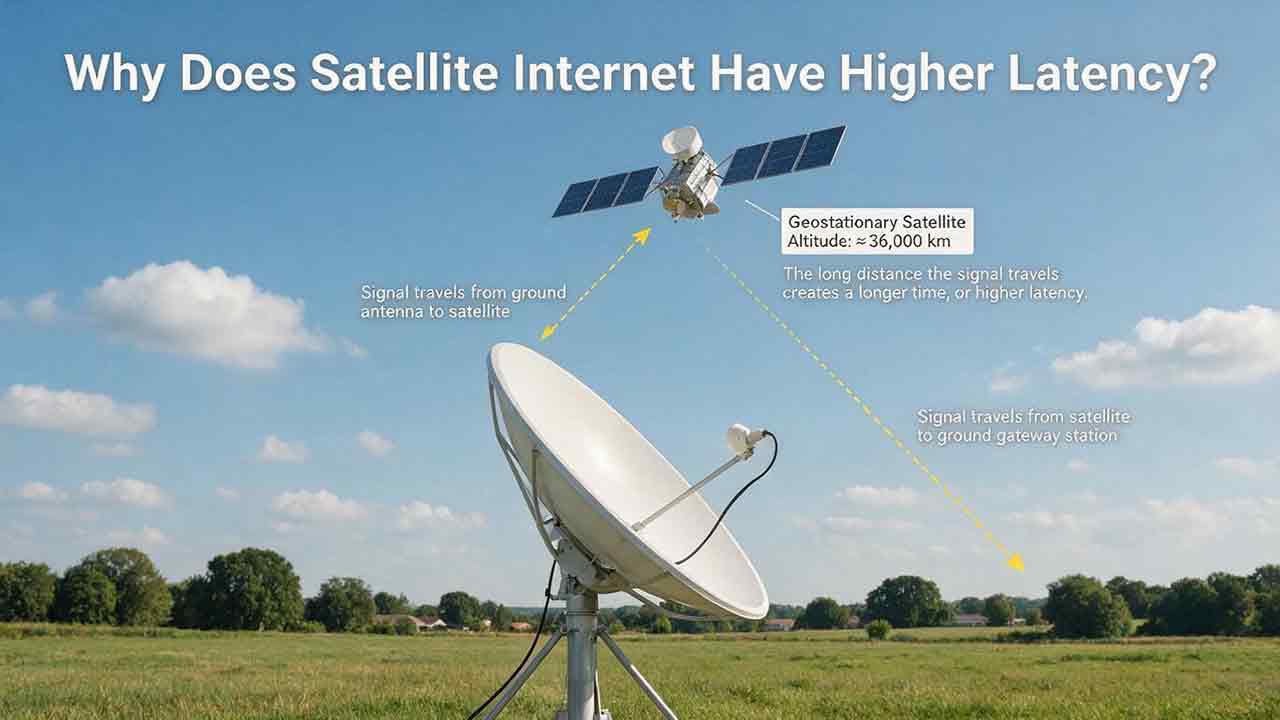
Why Does Satellite Internet Have Higher Latency?
Satellite internet often has higher latency because data must travel between a ground terminal, an orbiting satellite, a gateway and the wider internet before a response returns. This guide explains that delay through a transparent GEO propagation calculation, showing why an idealized four-leg path to a geostationary satellite corresponds to about 477 milliseconds before routing and processing are added. It also compares GEO and LEO architectures, clarifies the difference between bandwidth and latency, and examines how congestion, gateways, packet loss, Wi-Fi and upload saturation affect real-world performance. Readers can use the original Three-Layer Latency Framework, Two-Test Rule, diagnostic matrix and performance log to distinguish unavoidable orbital delay from provider-network or home-network problems. The article also helps rural households, remote workers and prospective buyers judge whether satellite latency is suitable for streaming, video calls, gaming, cloud applications and other everyday uses.
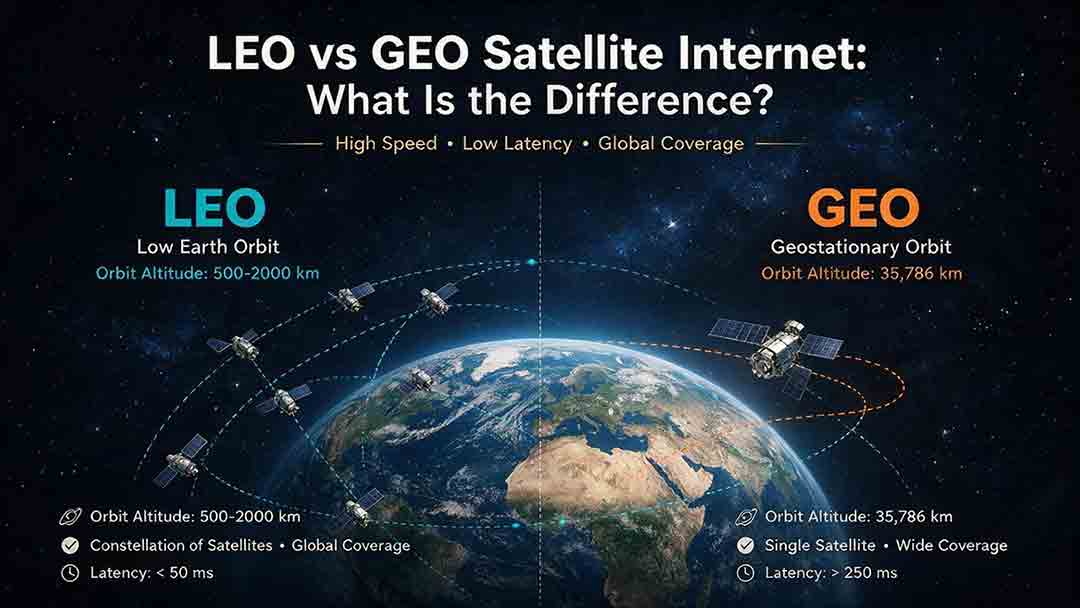
LEO vs GEO Satellite Internet: What Is the Difference?
LEO and GEO satellite internet differ mainly in orbital altitude, latency, coverage, and installation requirements. LEO networks use constellations of satellites moving relatively close to Earth, which generally provides lower latency for video meetings, remote desktops, cloud applications, voice calls, and many online games. GEO satellites remain in a fixed apparent position approximately 35,786 kilometers above the equator, allowing users to install permanently aligned dishes while receiving broad regional coverage. However, the longer signal path creates unavoidable propagation delay. This guide explains why orbit type does not determine download speed or reliability by itself. It compares network capacity, sky visibility, high-latitude coverage, weather effects, and address-level availability. Readers can also use the CosmoBasics LVC Decision Framework, worked propagation calculations, illustrative scenarios, six-step selection process, and buying checklist to evaluate whether LEO, GEO, or a terrestrial broadband service is the most practical option for their location.
Explore More Topics

How Do Satellites Detect Wildfires and Smoke?
Satellites detect wildfires by measuring unusual heat in infrared wavelengths, while visible, multispectral, and aerosol observations help analysts follow smoke across the atmosphere. This guide explains how systems such as GOES, VIIRS, MODIS, Landsat, and Sentinel contribute different pieces of the wildfire-monitoring picture. Readers will learn why a thermal hotspot is not the same as an exact fire perimeter, why satellite smoke imagery cannot replace ground-level PM2.5 measurements, and how clouds, terrain, viewing geometry, and satellite overpass timing can affect detection. The article also compares commonly used fire and smoke products, explains fire radiative power and the Normalized Burn Ratio, and provides a practical framework for choosing the right map. A documented Camp Fire example shows how multiple satellite and surface datasets can complement one another. Satellite information is valuable for situational awareness, but official emergency agencies remain the appropriate source for evacuation orders, road closures, and immediate safety decisions.

How Are Satellite Images Used in Agriculture?
Satellite images help farmers, agronomists, researchers, insurers, and public agencies monitor agricultural land across fields, regions, and growing seasons. This guide explains how optical, radar, thermal, and microwave satellite observations support crop-development monitoring, irrigation analysis, field mapping, flood and drought assessment, crop classification, and regional production forecasting. It distinguishes what satellites directly observe from calculated indices, classification results, and modeled estimates such as evapotranspiration. Readers will also learn how NDVI works, why spatial resolution and image timing matter, and when drones or field scouting are more appropriate. The original CosmoBasics SCALE Framework provides a practical way to decide whether satellite imagery fits a specific agricultural problem. Documented examples from USDA and OpenET show how operational products combine multiple observations, reference data, weather information, and models. Throughout the guide, satellite imagery is treated as a screening and monitoring tool—not a substitute for field verification, laboratory testing, or professional agricultural judgment.

What Is Synthetic Aperture Radar and How Does It Work?
Synthetic aperture radar, or SAR, is an active Earth-observation technology that creates detailed images by transmitting microwave pulses and measuring the echoes returned from the surface. This article explains how a moving satellite or aircraft collects repeated observations to form a virtual antenna, why SAR can operate at night and through most cloud cover, and how amplitude, phase, wavelength, polarization, surface roughness, moisture, and viewing geometry affect radar imagery. It also distinguishes pixel spacing from true spatial resolution, provides a transparent range-resolution calculation, and compares SAR with optical satellite imagery. Practical sections examine scattering mechanisms, flood mapping, agriculture, forests, ice, maritime monitoring, and InSAR-based ground-deformation analysis. Original interpretation and data-selection frameworks help readers evaluate backscatter patterns, choose suitable products, identify common errors, troubleshoot unexpected results, and communicate uncertainty without treating derived radar products as guaranteed ground truth.